

- Archives
- All files
- TI-84 Plus CE Programs
- TI-84 Plus CE BASIC Programs
- TI-84 Plus CE BASIC Educational Programs
These files are for the TI-84 Plus CE, 83 Premium CE, and other "CE" calculators with color screens. BASIC programs are compatible with the TI-84 Plus CSE and some BASIC programs written for monochrome 83+/84+ calculators will also work correctly. Assembly and C programs must be written for the CE calculators specifically; running them on calculators with an OS newer than 5.5 requires jailbreaking the calculator.
Categories
Files
-

BasicNote is an advanced text-editor written completely in the calculator's TI-Basic language!
Categorized under:
It is perfect for when you need to jot down a quick note, or even if you want to have fun creating several pages of notes. The program has several features that you might expect from a text editor, but that you probably weren't expecting from a TI-Basic text editor! Such things are text selecting and copy/paste, find&replace text, word wrapping and line breaks, special characters, auto saving, error detection and more. After 2 years of hard work, it is finally ready for the first release. Questions? Bug reports? Post in the thread: cemete.ch/t14483 -
This is a simple math question answering game.
Categorized under:
Has questions of varying difficulty.
Has a high score feature. -
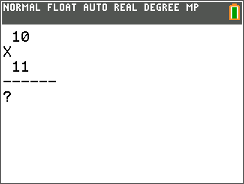
I got this idea from my sister when she needed to learn her math facts. Should be self explanitory
Categorized under: -
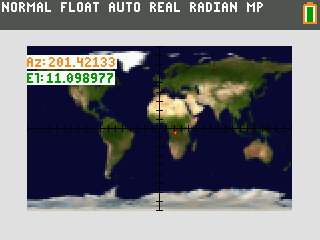
Track any satellite in real time!
Categorized under:
Orbit84 allows you to see the path of a satellite in real time.
For example, with this program, you can find out if the ISS is currently visible,
or follow a HAM radio satellite to see if it's reachable.
This program uses many complex algorithms, such as SGP, to find the precise position of a satellite and display it on a beautiful color map. -
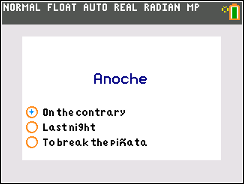
Study is a completely on-calculator flashcard and self-quiz suite in TI-BASIC for the TI-84 Plus CE (it's untested on the TI-84 Plus C Silver Edition but may still work). There are three programs: STUDY, INITSTDY, and INITDRAW. See the file "README.txt" for detailed instructions and other information regarding each program.
I hope that the Study suite will be useful and would greatly appreciate any and all comments, suggestions, and/or bug reports (especially regarding usage on the TI-84 Plus C Silver Edition as I do not own one on which to test the Study suite myself)!
Categorized under: -
This program will scramble a sentence of words, jumbling the letters of each word, but leaving the first and last letter the same. This was inspired by a study done by cambridge university (read about it here: http://www.snopes.com/language/apocryph/cambridge.asp). Use this program to see how the human brain can read words without spelling it right, as long as the first and last letters are the same. Use it for personal discoverey, and show your friends!
Categorized under: -
This is used to practice your math facts. You can do addition all the way to Trig. It is useful for teachers who want their kids to practice their math facts.
This volume now uses lowercase letters, Goto instead of prgm and negative numbersPlz unarchive this prgm if you are not using cesium
Categorized under: -
made this myself, due to the fact that I thought Post-Tag-System was cool and I wanted it on my calculator.
it is a model of computation similar to the Turing machine.there are technically uses for this thing, but using it on a graphing calculator limits it due to the fact that variables cannot be very large.
Categorized under: -

PRGM.CE Unit 1 is the first file in a series of PRGM.CE. PRGM.CE aims to educate people on how to program in TI-Basic (I'll try to get ASM, ICE, and others soon) coding language. This unit includes how to use Display (Disp) commands, Clear Home (ClrHome) commands, Output (Output() commands, and Pause (Pause ) commands. I also highly recommend you make a program to sharpen your skills after each unit. This is also relatively basic, to not make things complicated for coders just starting their coding journey. I don't have a TI84PCE Python, so don't expect to see Python tutorials anytime SOON.
Only control is ENTER.
Hope you like this file,ryanconmartians (btw this is my first program)
Categorized under: -
This simple TI-BASIC program generates possible sets of four numbers in Durer's Magic Square.
Note that it does generate duplicate sets. This is (the second version of) my first original program ever, so please cut me a little slack. I am currently working on a third version that doesn't count duplicates; stay tuned for updates.
There are two folders in the archive: v1 and v2. v1 contains a readme and the original program. v2 contains
Categorized under: -
Math Spitter is the first program I made and the only working program I have made in a long time. The program features multiplication, addition, and division. Basically, this program spits out random equations (solvable ones) and you have to answer them. It also has a timer and results at the end so you know how you did. The program contains a readme file that has instructions on how to install this on your calculator.
Categorized under: -

Recall is my first "post-able" program. Technically, the calculator randomly gives you words from a word bank and you have to remember them. Then you type them out.
If you have questions, suggestions, or criticism post them in the comments. They are all welcome. I can see this with many improvements.
This project is currently in v1.0.0
Please do not redistribute and if you really want to, give credit to me.I will be updating soon. Keep an eye on this!
Categorized under: -
Clock Utility CE is another port of mine from the unreleased version of Clock Utility for the monochrome calculators. In this new port, comes with new features never released in any of my clock programs (like Digital Clock Plus). This program features color text and backgrounds, moon phase and Easter Calculation, analog and digital clocks, stopwatch and timer, calendar, and more! Please use this on OS 5.3.0.0037 and newer.
Categorized under: -
If you ever get in arguments, you should have this program! This uses Nash's theorem to settle any argument in the mathematically fairest way possible. In short, you come up with ways the argument could end and then you and who you are arguing with rate how they feel about each option on a scale from 0-10 (0 being worst imaginable, 5 being no preference, 10 being best thing ever), the calculator does many calculations with these and determines the best and fairest way the argument could end. More information about what this program does found here: https://drive.google.com/file/d/0B14cKdTCuh88dHlLQWtlUl9OalU/view?usp=sharing&resourcekey=0-CNS0gHLA8pWE-PVpvtN0Wg. P.S, the program still works if you don't want to do feelings on a scale from 0-10, and instead do something more precise with any amount like money gained/lost or people dead or something (just make sure you use a bigger number as being better).
Categorized under: -
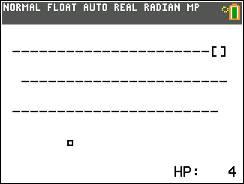
A mouse game in ti-84 that also can serve as a tutorial on how to add controls to move something on-screen using ti-basic. This game is quite fun with 4 levels. And by looking at the source code, you can implement cursors in your ti-basic programs.
Categorized under: -
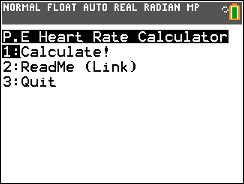
A simple program that allows you to calculate maximum heart rate, heart rate reserve, and target heart rate using the resting heart rate and percent ranges for the target heart rate (usually 60-85%). Only the TI-84 Plus CE is supported due to some of the margins I used for the text. (I haven't tested it on the base TI-84). (Please be gentle, this is my first program ever, and first time posting here. Thank you! ^_^)
Program Name: HRCALCPE
NOTE: When entering the lower and upper % limits, only enter the value; do not enter as a decimal and do not use any symbols. Read Me linked to this post goes more in depth.
Please let me know of any other issues! :-)
Categorized under: -
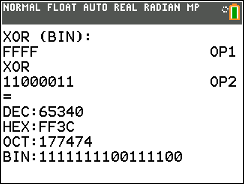
This is a group of TI-Basic programs and subroutines dedicated to base manipulation between binary/decimal/hex including a coders' calculator (supports and/or/xor), jmp calculator, and flashcards to help you to learn how to (practice) convert binary or hex to decimal in your head.
Categorized under: -

This is a group of TI-Basic programs and subroutines to encode/decode Morse code.
Categorized under:
File statistics are updated periodically, so numbers shown in this listing may not agree exactly with those shown on individual files.
Advertisement